Apache Doris 4.1 on Iceberg V3: Running the Full Lakehouse Lifecycle from One SQL Engine
Apache Doris 4.1 adds Iceberg V3 support: run UPDATE, DELETE, and MERGE INTO on Iceberg tables with Deletion Vectors and Row Lineage, all from SQL.
A quick grounding before we start. Apache Doris is an open-source real-time analytics and search database built for the AI era, delivering high-concurrency, low-latency analytics and search over large datasets. Apache Iceberg is an open table format that turns a pile of Parquet files in object storage into a transactional, schema-aware table that many engines can share. Doris has long served as a compute engine that reads Iceberg data directly, bringing low-latency analytics to the lakehouse. In 4.1, it goes further and adds full-lifecycle management on top of that read path.
This post is about what changes when Doris can do more than read.
TL;DR
- Apache Doris 4.1 adds full DML on Iceberg —
UPDATE,DELETE, andMERGE INTO— from the same SQL client you already use to query. - It also lands Iceberg V3, so DML stays cheap and observable instead of accumulating debt.
- Deletion Vectors replace a growing pile of Position Delete files with a single Puffin bitmap per data file. No more linear query-performance decay after every commit.
- Row Lineage adds two system columns (
_row_id,_last_updated_sequence_number) that give CDC a real watermark — one that compaction andrewrite_data_filesdon’t trip. - Net effect: “query → spot bad row → fix it” closes inside one engine. No second cluster, no Jira ticket to the platform team.
MERGE INTOand Row Lineage are shipped as experimental. POC before production.
If you want to skip the narrative and just try it, jump to Quick Start.
It’s 3 AM and You Just Want to Compact Some Files
A data engineer is in Doris, investigating odd values in an Iceberg table. Queries are fast. The problem is clear: a batch of rows under one dimension is wrong and needs fixing.
So they leave Doris.
They write a Spark job, adjust the scheduler, open a PR, wait for review. More commonly, they hand the ticket to the data lake platform team next door, because they don’t have cluster access. The next morning they come back to Doris to verify. The full loop took 14 hours. The code was one UPDATE.
The more everyday version of this pain is about small files. A CDC stream keeps writing into an Iceberg table, delete files accumulate, queries slow down. They know a rewrite_data_files run would fix it. But that procedure isn’t in their hands. The platform team schedules it, reviews it, waits for a maintenance window. A task that should be one SQL statement becomes a Jira ticket.
Iceberg made the table a neutral protocol. Interacting with that table is anything but neutral. Queries live in one engine, writes in another, maintenance in a third. Every small touch on the data pays two taxes: a switch-engine tax, and a cross-team tax.
Apache Doris 4.1 cuts both taxes in two ways. First, it fills out Iceberg’s DML so “query and fix” closes the loop inside one SQL client. Second, it lands Iceberg V3, so that loop can hold up architecturally.
What We Want to Be in the Iceberg Ecosystem
Apache Doris is an MPP SQL engine. It started as a data warehouse, and over the last two major releases has shifted its center of gravity toward lakehouse workloads. Its role in the Iceberg ecosystem is specific: a real-time query layer for Iceberg.
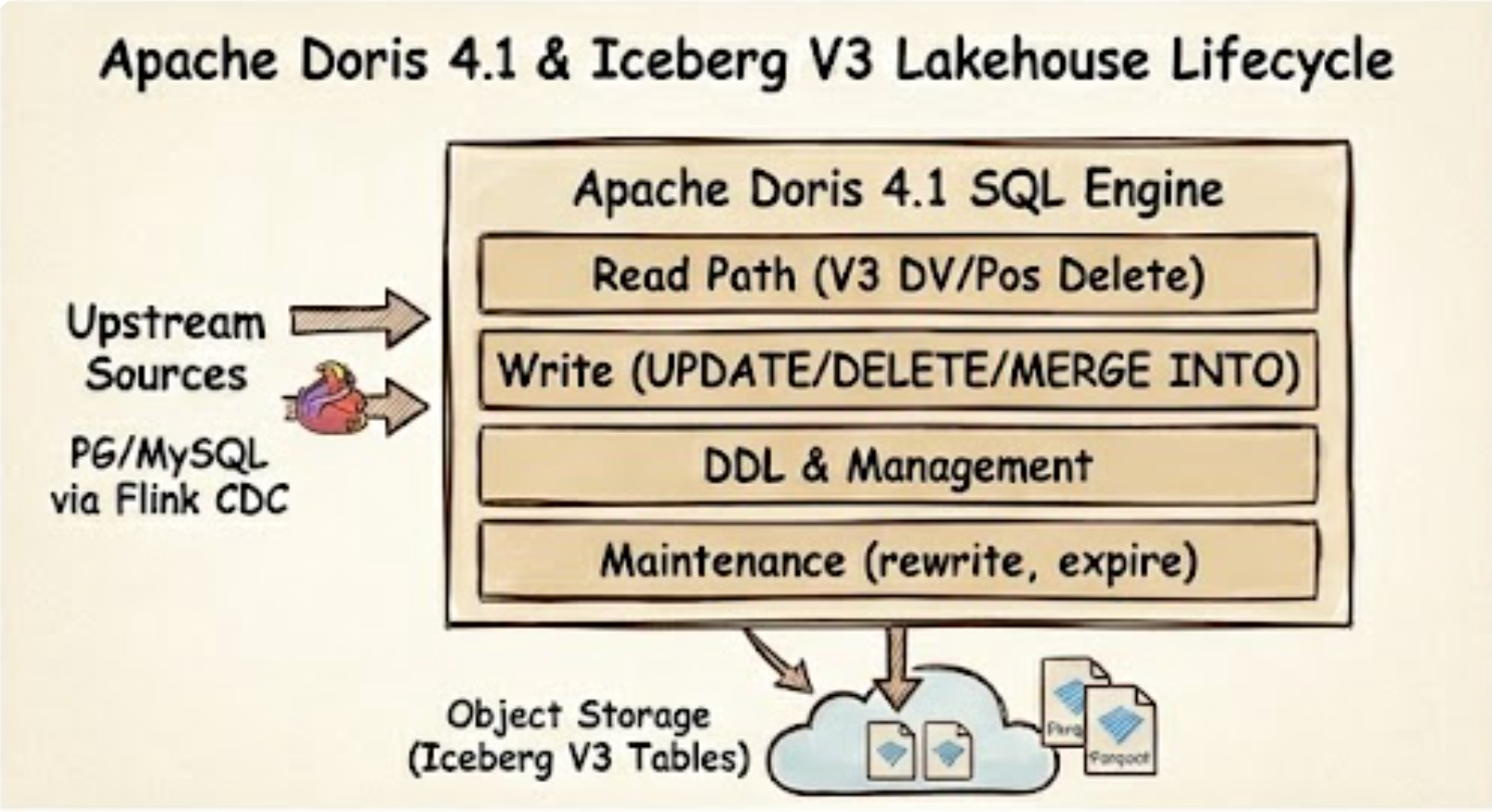 Apache Doris 4.1 closes the full Iceberg V3 lakehouse lifecycle — read, write, manage, and maintain — inside one SQL engine.
Spark remains the right tool for cross-source backfills at scale, long-running ETL, and the wider batch-and-stream ecosystem. We don’t cover those, and we aren’t trying to. Doris focuses on the adjacent workflow: once a query has brought you here, small edits, incremental reconciliation, and day-to-day maintenance shouldn’t force you to leave.
Hitting that bar takes more than fast reads. You need writes. You need DDL. You need maintenance procedures. You need diagnostics.
Here is what Doris covers on Iceberg today:
1
2
3
4
5
6
7
8
9
10
11
12
13
14
15
┌─────────────┬──────────────────────────────────────────────────┐
│   Read      │ V1/V2/V3 · Time Travel · Branch/Tag · View       │
│             │ 15+ System Tables · Pos/Eq/DV Delete             │
├─────────────┼──────────────────────────────────────────────────┤
│   Write     │ INSERT · OVERWRITE · CTAS · INSERT INTO BRANCH   │
│             │ DELETE · UPDATE · MERGE INTO                     │
├─────────────┼──────────────────────────────────────────────────┤
│   DDL       │ CREATE/DROP Table · Schema Change                │
│             │ Partition Evolution · Branch/Tag management      │
├─────────────┼──────────────────────────────────────────────────┤
│   Maintain  │ rewrite_data_files · expire_snapshots            │
│             │ rewrite_manifests · rollback · fast_forward ...  │
├─────────────┼──────────────────────────────────────────────────┤
│   Diagnose  │ Data File Distribution · Dangling Delete         │
└─────────────┴──────────────────────────────────────────────────┘
This post focuses on two pieces of that map: DML completeness, and the V3 support that makes DML architecturally viable. For the full support matrix, see the Doris Iceberg documentation.
Bringing DML Back to the Query Layer
Three Iceberg DML Operations That Shouldn’t Need a Second Engine
Fix one row. You’re reading results and spot a bad value. The old workflow: write a Spark job, change the schedule, wait for approval, verify the next day. The new workflow:
1
UPDATE iceberg_tbl SET name = 'Alice-fixed' WHERE id = 1;
Roll back a batch. A batch lands in the wrong partition, or an upstream bug poisons a day of data. Scheduling a full rewrite job to remove 1% of the rows is absurd. Instead:
1
DELETE FROM iceberg_tbl WHERE dt = '2026-04-01' AND source = 'bad_pipeline';
Reconcile an incremental batch. This case runs hundreds or thousands of times a day, and it leans hardest on MERGE INTO:
- CDC into the lake. Changes from upstream PostgreSQL or MySQL, routed through Flink CDC or similar tools, land in a target Iceberg table. Inserts, updates, and deletes all commit together.
- Incremental materialized views. When a fact table changes, downstream wide tables upsert by change key. Without
MERGE INTO, you either rebuild from scratch, or push the logic down into Flink or Spark and hand-write it.
These aren’t occasional operations. They are the main workflow. Whether DML is available and usable directly decides whether Iceberg can carry them.
A Closer Look at MERGE INTO on Iceberg
MERGE INTO is the most complex of the three, and the one Spark users will find most familiar. Doris ships it as an experimental feature, covering both WHEN MATCHED [AND ...] THEN UPDATE/DELETE and WHEN NOT MATCHED THEN INSERT:
1
2
3
4
5
6
7
8
9
10
MERGE INTO iceberg_tbl t
USING (
    SELECT 1 AS id, 'Alice_new' AS name, 26 AS age, 'U' AS flag
    UNION ALL SELECT 2, 'Bob',  30, 'D'
    UNION ALL SELECT 4, 'Dora', 28, 'I'
) s
ON t.id = s.id
WHEN MATCHED AND s.flag = 'D' THEN DELETE
WHEN MATCHED THEN UPDATE SET name = s.name, age = s.age
WHEN NOT MATCHED THEN INSERT (id, name, age) VALUES (s.id, s.name, s.age);
This is the upsert pattern that CDC ingestion and incremental materialized views depend on, expressed in one statement. Doris supports partitioned targets, subqueries as the source, and expressions in UPDATE clauses (for example age = age * 2 + 1). The target table must be format-version >= 2.
Having DML Isn’t the Same as Having Good DML
Under V2 semantics, every DELETE, UPDATE, and MERGE INTO writes a Position Delete file. Readers anti-join those files against the data files to produce correct results. After hundreds of small DML commits, the delete-file count grows linearly, every query opens and merges every relevant delete file, and you need to run rewrite_data_files on a schedule. That brings us back to the Jira ticket from the top of this post.
There’s a second cost. Once a commit lands, downstream systems no longer know when any individual row was last modified. CDC pipelines fall back to diffing snapshots. The moment a compaction runs between two snapshots, unmodified rows look like “new data” to the diff, and the pipeline reprocesses them.
Call these two costs by their names:
- Performance debt. Every DML commit piles on more small files.
- Observability debt. Every DML commit erases row-level change signals.
Iceberg V3 addresses each debt with a distinct feature.
Part One: Iceberg V3 Deletion Vectors Make DML Cheap
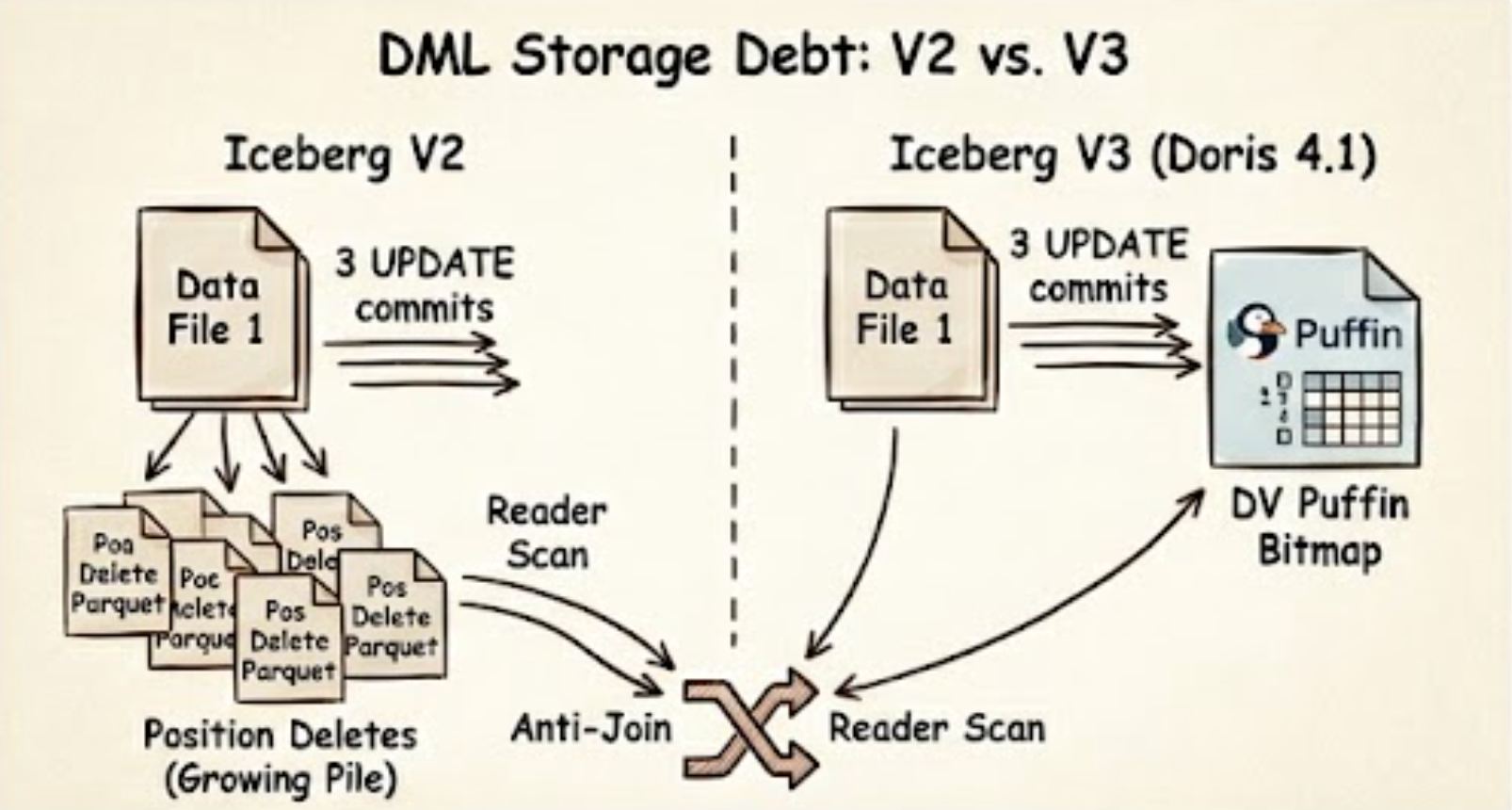 DML storage debt: V2 accumulates one Position Delete parquet per commit (anti-join at read), while V3 collapses every edit into a single DV Puffin bitmap.
File Layout Under V2
Walk through a concrete example. Build a small CDC-style table, do an initial load, then apply three small edits:
1
2
3
4
5
6
7
8
9
10
11
12
CREATE TABLE orders_v2 (
    id INT, status STRING, amount DECIMAL(10,2)
) PROPERTIES ('format-version' = '2');

INSERT INTO orders_v2 VALUES
    (1, 'pending', 100),
    (2, 'pending', 200),
    (3, 'pending', 300);

UPDATE orders_v2 SET status = 'shipped' WHERE id = 1;
UPDATE orders_v2 SET status = 'shipped' WHERE id = 2;
DELETE FROM orders_v2 WHERE id = 3;
Inspect the physical layout through the $files system table:
1
SELECT content, file_path, record_count FROM orders_v2$files;
1
2
3
4
5
6
7
8
+---------+------------------------------------+--------------+
| content | file_path                          | record_count |
+---------+------------------------------------+--------------+
|    0    | .../data/00000-...parquet          |       3      |   <- data
|    1    | .../data/00001-...delete.parquet   |       1      |   <- pos delete
|    1    | .../data/00002-...delete.parquet   |       1      |   <- pos delete
|    1    | .../data/00003-...delete.parquet   |       1      |   <- pos delete
+---------+------------------------------------+--------------+
(In the content column, 0 denotes a data file, 1 a Position Delete file, and 2 an Equality Delete file.)
Three DML commits produced three separate Position Delete files. Every subsequent query performs three anti-joins to return the right rows. Scale that to a CDC table with thousands of daily DML commits, and you get linear query-performance decay.
The Same Workload Under V3
Replay the same operations on a V3 table:
1
2
3
4
5
6
7
8
9
CREATE TABLE orders_v3 (
    id INT, status STRING, amount DECIMAL(10,2)
) PROPERTIES ('format-version' = '3');

INSERT INTO orders_v3 VALUES (1, 'pending', 100), (2, 'pending', 200), (3, 'pending', 300);

UPDATE orders_v3 SET status = 'shipped' WHERE id = 1;
UPDATE orders_v3 SET status = 'shipped' WHERE id = 2;
DELETE FROM orders_v3 WHERE id = 3;
Run the same $files query:
1
2
3
4
5
6
+---------+------------------------------------+--------------+
| content | file_path                          | record_count |
+---------+------------------------------------+--------------+
|    0    | .../data/00000-...parquet          |       3      |   <- data
|    1    | .../data/00000-dv.puffin           |       3      |   <- Deletion Vector
+---------+------------------------------------+--------------+
After three DML commits, there’s still only one Puffin-format Deletion Vector. Each edit updates the same bitmap instead of creating a new file. The reader reads the data, reads the DV alongside, and applies the bitmap in one pass. No anti-join.
The Numbers: File Count, Storage, and Query Latency
The file-layout comparison tells only half the story. Below is a direct Doris-side benchmark across three scenarios that cover different data shapes, file counts, and delete ratios. All times are in seconds.
File count and delete-file size
Under V2, every DML commit produces a new Position Delete file per data file. After 20% of rows are deleted across 16 data files, that means 320 delete files need to be opened and anti-joined on every scan. V3 collapses all of them into a single Puffin Deletion Vector.
| Scenario | V2 — Position Deletes | V3 — Deletion Vector |
|---|---|---|
| Files to open (16 data files, 20% deleted) | 336 (16 data + 320 delete) | 17 (16 data + 1 puffin) |
| Delete storage — 100M rows, 99% deleted | 98 MiB (3 delete files) | 3.8 MiB (1 puffin) |
| Delete storage reduction | — | ~96% |
Query latency — 16 data files, 1M rows
As the delete ratio climbs, the anti-join overhead of Position Delete files grows with it. Deletion Vectors stay flat.
| Delete % | Doris V2 | Doris V3 | Speedup |
|---|---|---|---|
| 5% | 0.31s | 0.15s | 2.1× |
| 10% | 0.35s | 0.16s | 2.2× |
| 20% | 0.43s | 0.17s | 2.5× |
| 30% | 0.46s | 0.14s | 3.3× |
| 40% | 0.39s | 0.17s | 2.3× |
Doris V3 is 2–3× faster at 5% delete and 3× faster at 30–40%. Query latency becomes effectively independent of delete ratio under V3.
Query latency — large file, 99% deleted (multi row-group Parquet)
Large files are split across multiple read splits. Under V2, Position Delete files must still be fully merged before any split can return results, making the anti-join cost unavoidable regardless of parallelism.
| Table version | Doris (Q1) | Doris (Q2) |
|---|---|---|
| V2 (Position Delete) | 3.42s | 3.28s |
| V3 (Deletion Vector) | 1.03s | 0.86s |
| Speedup | ~3× | ~3× |
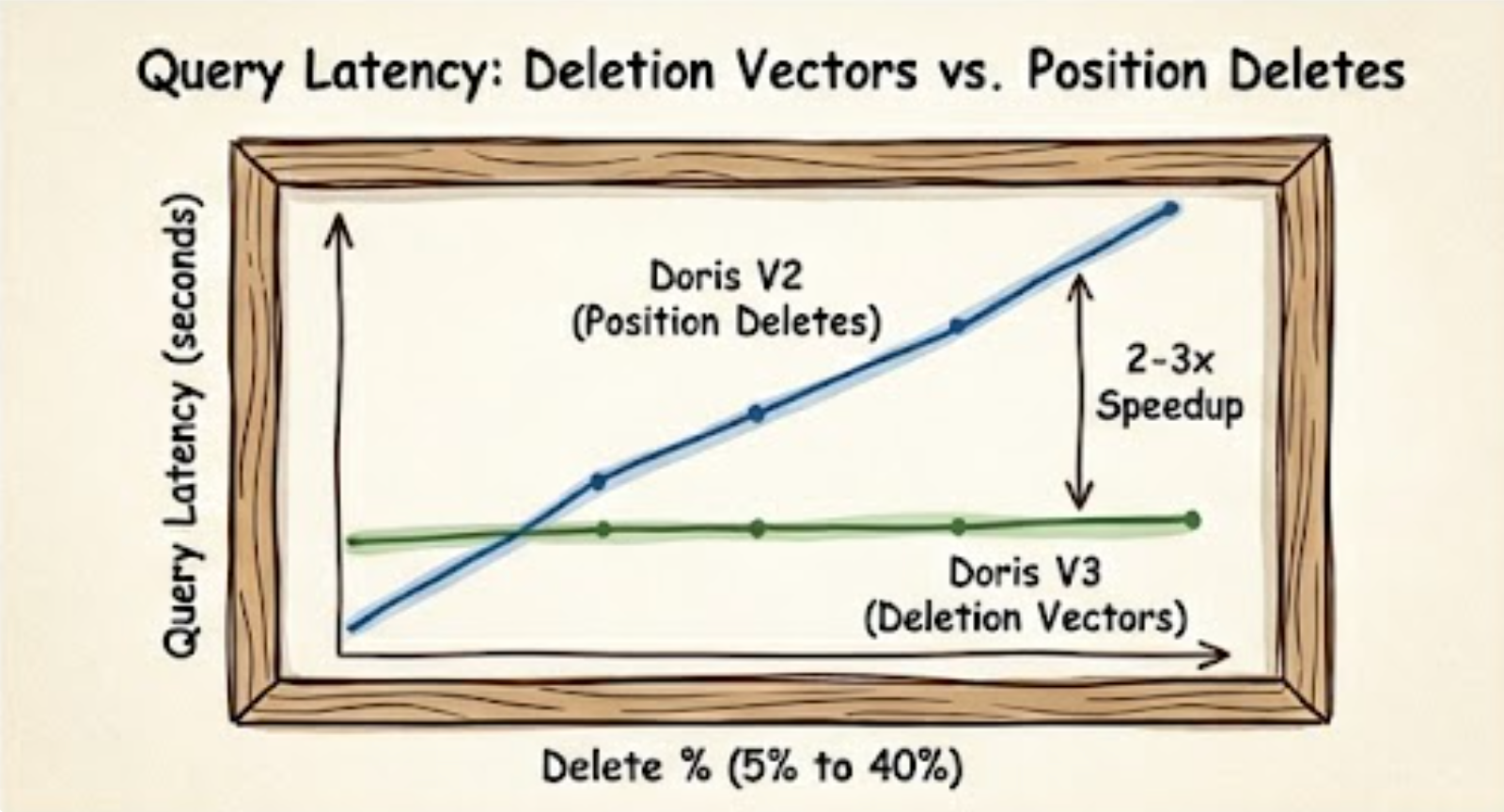 Doris on Iceberg V3 vs V2 across delete ratios — V3’s Deletion Vector keeps query latency flat while V2’s Position Delete anti-join cost climbs.
The pattern is consistent across all scenarios: Deletion Vectors eliminate the anti-join entirely. Query latency stays flat as the delete ratio grows, and storage for delete metadata drops by an order of magnitude.
What Doris Implements for Deletion Vectors
For V3 Deletion Vectors to deliver value, an engine has to support both read and write. Read-only engines can only consume DVs written elsewhere. Write-only engines write DVs nobody can read.
- Read. Doris reads Puffin-format Deletion Vectors. V3 tables are queryable without further configuration.
- Write.
DELETE,UPDATE, andMERGE INTOon a V3 table produce Puffin Deletion Vectors automatically, instead of Position Delete files. The user-facing SQL doesn’t change. You declareformat-version = 3on the target table, and Doris handles the semantic switch.
Caveats
MERGE INTOis experimental. POC before production.- Concurrent writes use Iceberg’s optimistic concurrency control, so conflicts surface as transaction exceptions.
DELETE,UPDATE, andMERGE INTOrequireformat-version >= 2. Only V3 gets Deletion Vectors.
Part Two: Iceberg V3 Row Lineage Makes DML Observable
V2 Has No Row-Level Provenance
Two real scenarios.
Incremental synchronization. A downstream system subscribes to Iceberg changes by diffing snapshots. But compaction and rewrite_data_files produce new snapshots without changing the logical data. From the downstream’s point of view, every row involved in the rewrite looks like new data and gets reprocessed.
Audit trails. The compliance team asks: “When was user_id = 42 last modified?” An external audit log can only half-answer. The audit system and the table state are two different systems, and after compaction the physical files aren’t the files the audit recorded, so row-level provenance breaks.
Both problems share a root cause. In Iceberg V1 and V2, change-tracking information lives only at the snapshot level. No row carries “when was I last modified” as metadata.
Two Hidden Columns from V3
V3 defines two row-level system columns:
_row_id: a unique numeric identifier for each row._last_updated_sequence_number: the sequence number of this row’s most recent modification. EveryUPDATEorMERGE INTOincrements it automatically.
Both columns are maintained by the system and cannot be written by users. Crucially, _last_updated_sequence_number is a natural watermark for incremental synchronization. Physical rewrites and compactions do not bump it. Only real data changes do.
What the Data Actually Looks Like
Create a V3 table and walk it through three steps (insert, update, insert), querying the hidden columns at every step.
1
2
3
4
5
6
7
8
9
10
11
12
13
CREATE TABLE users_v3 (
    id INT, name STRING, email STRING
) PROPERTIES ('format-version' = '3');

SET show_hidden_columns = true;

-- Step 1: initial insert of 3 rows
INSERT INTO users_v3 VALUES
    (1, 'Alice', 'alice@x.com'),
    (2, 'Bob',   'bob@x.com'),
    (3, 'Carol', 'carol@x.com');

SELECT id, name, email, _row_id, _last_updated_sequence_number FROM users_v3;
1
2
3
4
5
6
7
+----+-------+-------------+---------+-------------------------------+
| id | name  | email       | _row_id | _last_updated_sequence_number |
+----+-------+-------------+---------+-------------------------------+
|  1 | Alice | alice@x.com |    0    |              1                |
|  2 | Bob   | bob@x.com   |    1    |              1                |
|  3 | Carol | carol@x.com |    2    |              1                |
+----+-------+-------------+---------+-------------------------------+
Each row received a stable _row_id. All three share SN = 1, the sequence number of the first commit.
1
2
3
4
-- Step 2: update Bob's email
UPDATE users_v3 SET email = 'bob@newmail.com' WHERE id = 2;

SELECT id, name, email, _row_id, _last_updated_sequence_number FROM users_v3;
1
2
3
4
5
6
7
+----+-------+------------------+---------+-------------------------------+
| id | name  | email            | _row_id | _last_updated_sequence_number |
+----+-------+------------------+---------+-------------------------------+
|  1 | Alice | alice@x.com      |    0    |              1                |
|  2 | Bob   | bob@newmail.com  |    1    |              2                |  <-- SN++
|  3 | Carol | carol@x.com      |    2    |              1                |
+----+-------+------------------+---------+-------------------------------+
Bob’s _row_id stays at 1. His _last_updated_sequence_number moves from 1 to 2. Alice and Carol are untouched.
1
2
3
4
-- Step 3: insert a new row
INSERT INTO users_v3 VALUES (4, 'Dora', 'dora@x.com');

SELECT id, name, email, _row_id, _last_updated_sequence_number FROM users_v3;
1
2
3
4
5
6
7
8
+----+-------+------------------+---------+-------------------------------+
| id | name  | email            | _row_id | _last_updated_sequence_number |
+----+-------+------------------+---------+-------------------------------+
|  1 | Alice | alice@x.com      |    0    |              1                |
|  2 | Bob   | bob@newmail.com  |    1    |              2                |
|  3 | Carol | carol@x.com      |    2    |              1                |
|  4 | Dora  | dora@x.com       |    3    |              3                |  <-- new
+----+-------+------------------+---------+-------------------------------+
Dora arrives with the latest SN = 3.
What Incremental Sync Looks Like Downstream
Suppose the downstream system is already synchronized through SN = 1. To pull the delta:
1
2
3
SELECT id, name, email, _last_updated_sequence_number
FROM users_v3
WHERE _last_updated_sequence_number > 1;
1
2
3
4
5
6
+----+------+-----------------+-------------------------------+
| id | name | email           | _last_updated_sequence_number |
+----+------+-----------------+-------------------------------+
|  2 | Bob  | bob@newmail.com |              2                |
|  4 | Dora | dora@x.com      |              3                |
+----+------+-----------------+-------------------------------+
Only the two actually-changed rows come back. Alice and Carol stay out of the pipeline. Even if a compaction or rewrite_data_files runs between checkpoints, they still stay out, because physical rewrites don’t bump _last_updated_sequence_number.
The downstream tracks one number: the current watermark. On the next pull, it substitutes :watermark with the maximum SN from the previous pull.
Here is the CDC pipeline before and after:
1
2
3
4
5
6
7
8
9
10
11
12
13
14
15
16
17
18
19
20
21
22
23
24
25
26
27
28
29
30
31
Before (V2 snapshot diff)
─────────────────────────
[PG]──binlog──>[Flink CDC]──>[Iceberg V2 Sink]
                                   │
                                   ▼
                            ┌──────────────┐
                            │ Snapshot Diff│
                            └──────┬───────┘
                                   │
                  ┌────────────────┼────────────────┐
                  ▼                ▼                ▼
              real change      compaction        rewrite
                               (false positive) (false positive)
                  │                │                │
                  └────────────────┼────────────────┘
                                   ▼
                      [Downstream table / view]
                    (can't distinguish; reprocess all)


After (V3 Row Lineage)
─────────────────────────
[PG]──binlog──>[Flink CDC]──>[Iceberg V3 Sink]
                                   │
                                   ▼
     SELECT * FROM t
     WHERE _last_updated_sequence_number > :watermark
                                   │
                                   ▼
                      [Downstream table / view]
                     (consume only real changes)
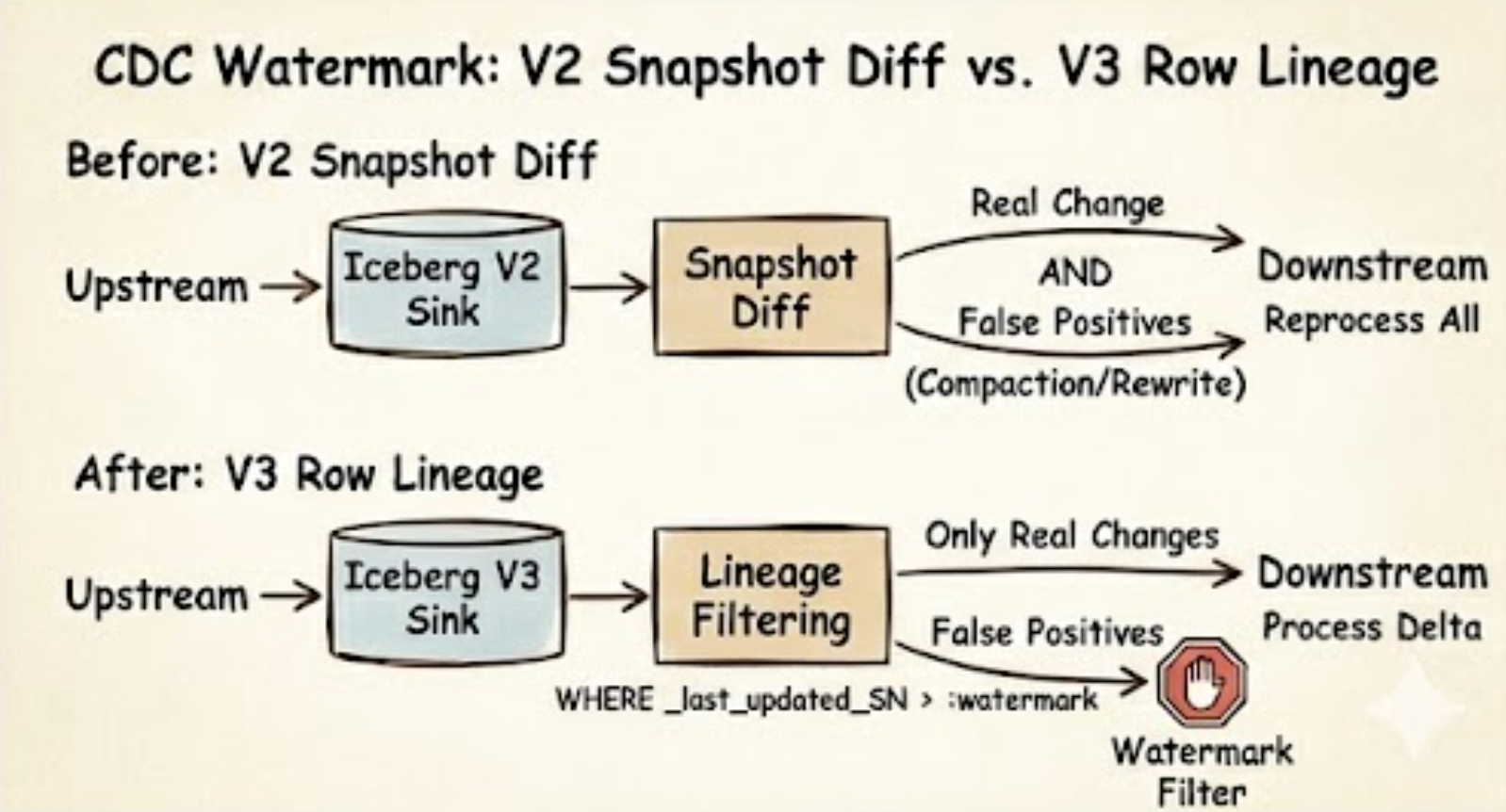 Row Lineage attaches
 _row_id and _last_updated_sequence_number to every row — a stable identity that survives compaction and a watermark that only real DML moves.
What Doris Implements for Row Lineage
- Query. Hidden by default. Reference the columns explicitly to read them, or set
show_hidden_columns = truesoDESCandSELECT *show them too. - Automatic maintenance.
UPDATEandMERGE INTOon V3 tables bump_last_updated_sequence_numberas part of the write. This is where DML and lineage meet. The user does nothing extra, and row-level change tracking is built into every DML commit.
Caveats
- Row Lineage is experimental.
- Only tables with
format-version = 3expose these columns. Querying them on V1 or V2 tables raises an error. _row_idand_last_updated_sequence_numberare system-maintained.INSERTcannot write to them.
Case: Tracing a Row’s Full Change History via _row_id
The problem
A financial auditor asks: “Order 102 was modified three times — what were the amounts at each step?” Under V2, reconstructing this history requires cross-referencing external audit logs. Under V3, the table itself remembers, and _row_id is the key.
Step 1 — Initial insert: capture the row’s stable identity
1
2
3
4
5
6
7
8
9
SET show_hidden_columns = true;

INSERT INTO orders_v3 VALUES
    (101, 1001, 50.00, '2026-04-01'),
    (102, 1002, 80.00, '2026-04-01'),   -- order 102 initial: amount = 80
    (103, 1003, 120.00, '2026-04-01');

-- Capture order 102's _row_id — this is its lifetime identity
SELECT order_id, _row_id, _last_updated_sequence_number FROM orders_v3 WHERE order_id = 102;
1
2
3
4
5
+----------+---------+-------------------------------+
| order_id | _row_id | _last_updated_sequence_number |
+----------+---------+-------------------------------+
|      102 |       1 |              1               |
+----------+---------+-------------------------------+
_row_id = 1is order 102’s permanent identity. It never changes across UPDATE or compaction.
Step 2 — First update (customer complaint, partial refund)
1
UPDATE orders_v3 SET amount = 90.00 WHERE order_id = 102;  -- SN: 1 → 2
Step 3 — Second update (final settlement)
1
UPDATE orders_v3 SET amount = 100.00 WHERE order_id = 102;  -- SN: 2 → 3
Step 4 — Reconstruct the full change log
1
2
3
4
5
6
7
8
9
10
11
12
13
14
15
16
17
18
19
20
21
22
23
-- SN=1: initial state
SELECT order_id, amount FROM orders_v3 FOR VERSION AS OF <snapshot_id_at_SN1> WHERE _row_id = 1;
-- +----------+--------+
-- | order_id | amount |
-- +----------+--------+
-- |      102 |  80.00 |   ← initial, SN=1
-- +----------+--------+

-- SN=2: first modification
SELECT order_id, amount FROM orders_v3 FOR VERSION AS OF <snapshot_id_at_SN2> WHERE _row_id = 1;
-- +----------+--------+
-- | order_id | amount |
-- +----------+--------+
-- |      102 |  90.00 |   ← after first update, SN=2
-- +----------+--------+

-- SN=3: current state
SELECT order_id, amount FROM orders_v3 WHERE _row_id = 1;
-- +----------+--------+
-- | order_id | amount |
-- +----------+--------+
-- |      102 | 100.00 |   ← final settlement, SN=3
-- +----------+--------+
Change chronology:
| Snapshot SN | Amount | Event |
|---|---|---|
| SN=1 | 80.00 | Order created |
| SN=2 | 90.00 | Customer complaint — partial refund |
| SN=3 | 100.00 | Final settlement |
Why compaction doesn’t erase this history
If ALTER TABLE orders_v3 EXECUTE rewrite_data_files() runs between those updates, new physical files are written — but _row_id stays 1 and _last_updated_sequence_number stays at 3 for order 102. The audit trail survives the physical rewrite because SN is a logical property, not a physical one. Under V2, the same compaction would produce a new snapshot_id with no way to know whether the rows inside were actually modified.
What _last_updated_sequence_number gives you at scale
The same mechanism powers CDC incremental sync without snapshot-diffing:
1
2
3
4
5
-- Downstream tracks watermark = max(SN) it has processed
-- Next pull: get only rows whose SN is strictly greater than the watermark
SELECT order_id, amount, _last_updated_sequence_number
FROM orders_v3
WHERE _last_updated_sequence_number > :watermark;
Every returned row is a real, un-compacted change. The watermark is a single integer. No false positives.
Quick Start: Try It in Five Minutes
Enough narrative. Here is the shortest path from zero to a V3 table you can poke at.
Prerequisites.
- Apache Doris 4.1.0 or later (download or pull
apache/doris:4.1.0from Docker Hub). - An Iceberg catalog that speaks V3. The most reliable choice today is a REST Catalog — for example Apache Polaris, Lakekeeper, or Tabular’s open-source REST catalog image. Hive Metastore-backed catalogs work for V1/V2 reads but lag on V3; AWS Glue and Aliyun DLF are read-only at the moment (see docs).
- An object store reachable from Doris BEs (S3, MinIO, OSS, or HDFS).
1. Wire up the catalog. From any MySQL-protocol client connected to your Doris FE:
1
2
3
4
5
6
7
8
9
10
11
12
13
14
CREATE CATALOG iceberg_v3 PROPERTIES (
    'type'              = 'iceberg',
    'iceberg.catalog.type' = 'rest',
    'uri'               = 'http://your-rest-catalog:8181',
    'warehouse'         = 's3://your-bucket/warehouse',
    's3.endpoint'       = 'https://s3.us-west-2.amazonaws.com',
    's3.access_key'     = '<AK>',
    's3.secret_key'     = '<SK>',
    's3.region'         = 'us-west-2'
);

SWITCH iceberg_v3;
CREATE DATABASE IF NOT EXISTS demo;
USE demo;
2. Create a V3 table and run real DML.
1
2
3
4
5
6
7
8
CREATE TABLE orders (
    id INT, status STRING, amount DECIMAL(10,2)
) PROPERTIES ('format-version' = '3');

INSERT INTO orders VALUES (1,'pending',100), (2,'pending',200), (3,'pending',300);

UPDATE orders SET status = 'shipped' WHERE id = 1;
DELETE FROM orders WHERE id = 3;
3. Verify the V3 behavior. Two checks — one for Deletion Vectors, one for Row Lineage:
1
2
3
4
5
6
-- (a) DV instead of Position Delete files: expect one .puffin file, not three .parquet deletes
SELECT content, file_path, record_count FROM orders$files;

-- (b) Row Lineage columns visible and correctly bumped
SET show_hidden_columns = true;
SELECT id, status, _row_id, _last_updated_sequence_number FROM orders;
If orders$files shows a single Puffin file alongside the data file, and the surviving rows carry sensible _row_id / _last_updated_sequence_number values, your stack is V3-ready end to end.
4. Try MERGE INTO. This is the experimental path — useful for CDC-style upserts:
1
2
3
4
5
MERGE INTO orders t
USING (SELECT 1 AS id, 'delivered' AS status, 110 AS amount) s
ON t.id = s.id
WHEN MATCHED THEN UPDATE SET status = s.status, amount = s.amount
WHEN NOT MATCHED THEN INSERT (id, status, amount) VALUES (s.id, s.status, s.amount);
Common gotchas.
format-version = 3must be set at table creation time. To migrate an existing V2 table, useALTER TABLE ... SET PROPERTIES ('format-version' = '3').- Hidden columns return errors on V1/V2 tables — only V3 exposes them.
- If
MERGE INTOparsing fails, confirm you are on 4.1.0+ and the target table is V2 or V3. - Concurrent writers can hit optimistic-concurrency conflicts. Add application-side retry for high-conflict workloads.
For the full configuration reference, see the Doris Iceberg catalog docs.
Boundaries and Trade-offs
MERGE INTOand Row Lineage are both experimental. The API and behavior may change in later versions. POC before production.- Heavy backfills, cross-source ETL, and long-running batch jobs still run best on Spark. They are out of scope for this post.
- Streaming ingestion is out of scope here. The DML discussed above is SQL-client batch operations.
- Some catalog services remain limited. AWS Glue and Aliyun DLF currently support reads only, with DDL and writes still gated. REST Catalog behavior depends on the specific implementation. See the Doris documentation for the full support matrix.
- Concurrent writes use Iceberg’s optimistic concurrency control. High-conflict workloads need application-side retry or serialization.
Summary
One sentence captures what Doris is doing on Iceberg: once a query has brought you here, small edits, incremental reconciliation, and day-to-day maintenance shouldn’t force you to leave.
Heavy ETL goes to Spark. Streaming ingestion goes to Flink. Real-time queries, small DML, row-level provenance, and day-to-day maintenance belong in the SQL client already open in front of you. V3 is the piece that makes this architecturally real. Deletion Vectors keep DML from accumulating performance debt, and Row Lineage keeps DML from erasing observability.
Next time we’ll look at Apache Paimon, plus Doris’s work on streaming write paths. Bring your workloads and your complaints. Issues and Slack are open.
Further Reading
From this blog
- Beyond JSON: The Evolution of Variant Data Types in Modern Analytics — another piece of the Iceberg V3 story: how semi-structured data fits into the open-format conversation.
- How Hard Is It to Add an Index to an Open Format — what the Iceberg community is debating about secondary indexes, another V3-era design challenge built on the same Puffin foundation as Deletion Vectors.
External
- Apache Iceberg V3 specification
- Puffin file format specification — the container format for Deletion Vectors
- Apache Doris Iceberg catalog docs
- Apache Doris on GitHub